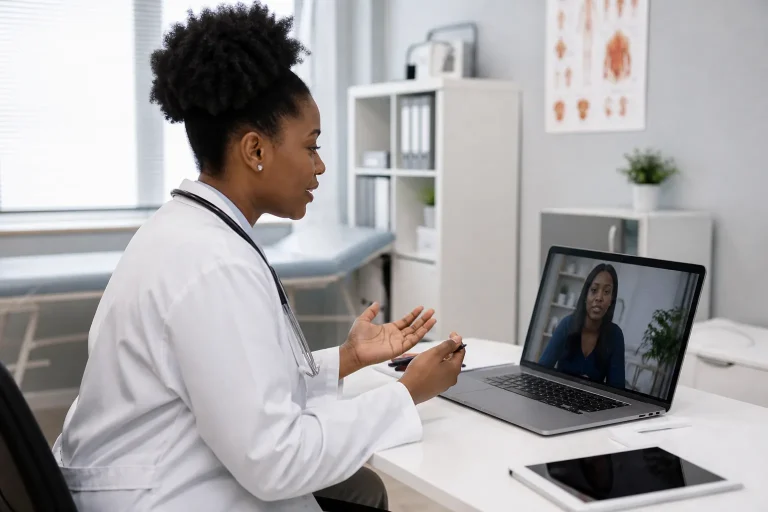
Ten years ago, “digital skills” in many care roles meant checking email and clocking in. Today, the same workers may update electronic care notes, join a telemedicine visit from a client’s living room, troubleshoot a scheduling app, verify identity on a video call, and decide—wisely—what never belongs in an unsecured chat thread.
Digital health is not only for hospitals with large IT departments. It is reshaping home care, community clinics, long-term care, and cross-border training. This article maps the practical skills healthcare workers need now: privacy habits, platform fluency, telemedicine support, documentation in digital systems, and critical judgment about AI-enabled tools.
Skill stack 1: Privacy and security as daily habits
Technology fails open when humans rush. Build non-negotiables:
- Lock screens every time you step away.
- Use employer-approved channels only for client information.
- Verify recipient names before sending documents or messages.
- Avoid public Wi-Fi for sensitive care work unless a secure method is provided.
- Do not photograph clients, wounds, medication sheets, or charts on personal devices unless policy explicitly authorizes a secure workflow.
- Log out of shared workstations.

Skill stack 2: Electronic documentation fluency
Digital notes are only as good as the thinking behind them. Workers need to:
- Find the correct client chart efficiently.
- Enter timely, factual observations in the right fields.
- Avoid copy-paste errors that duplicate yesterday’s note onto today’s reality.
- Understand that timestamps and user IDs create accountability.
- Know how to correct mistakes through the proper amendment process—not by inventing workarounds.
If documentation fundamentals still feel shaky, strengthen them first through Healthcare Documentation and the Insights guide on why healthcare documentation skills matter. Digital systems amplify both good and poor charting habits.
Skill stack 3: Telemedicine and remote care support
In home and community settings, support workers and caregivers often become the invisible infrastructure of telemedicine: arranging lighting, seating, device positioning, interpreter needs, and a quiet room. Clinicians drive the clinical conversation; you often drive whether that conversation can happen at all.
Before the call
- Confirm time, platform, and what the client should have nearby (medication list, blood pressure cuff if used, questions written down).
- Test audio/video early when policy allows.
- Charge devices; keep a backup plan for dropped connections.
- Prepare the environment: privacy, lighting on the face, camera at a stable angle.
During the call
- Support identity verification steps required by the service.
- Stay in the clinician’s line of guidance—do not answer clinical questions for the client unless asked to assist with clarification.
- Help relay speakerphone issues, lag, or misunderstood instructions without taking over the visit.
- Watch for client distress and pause the process if needed.
After the call
- Confirm the client understands next steps in plain language.
- Document per protocol what occurred and any follow-up assigned to your role.
- Escalate technical failures that blocked care.
Figora’s Digital Health & Telemedicine course is designed to build this operational confidence for learners preparing for digitally enabled care environments.
Skill stack 4: Coordination tools and digital professionalism
Scheduling software, care management dashboards, e-learning portals, and internal messaging systems all require professional behaviour:
- Update visit statuses honestly and promptly.
- Read messages before arriving on site when that is part of your workflow.
- Do not ignore alerts you are responsible for acknowledging.
- Keep profile information accurate.
- Use clear subject lines and concise updates.
Digital professionalism also includes knowing when a phone call is better than a message—especially for urgent safety concerns.

Skill stack 5: AI literacy without hype
AI tools are entering healthcare administration, documentation assistance, imaging support, customer service triage, and learning platforms. For frontline support workers, the immediate skills are less about building models and more about judgment:
- Do not paste identifiable client information into public AI chat tools.
- Treat AI summaries as drafts that need human verification.
- Understand that AI can reflect bias and can be confidently wrong.
- Follow employer policy on approved tools only.
- Use AI-enabled learning aids to practice scenarios—not to invent clinical advice for clients.
For a deeper narrative on workplace change, read how AI is changing everyday healthcare work.
Equity and access: the human side of digital care
Digital health can widen access—and it can widen gaps. Clients may lack broadband, share phones within a household, feel shame about low literacy with apps, or live with disabilities that make small screens difficult. Healthcare workers become translators between systems designed in offices and lives lived in apartments, rural communities, and multi-generational homes.
Practical equity skills include:
- Asking early what device and connectivity the client actually has—not what the flyer assumes.
- Offering phone-based alternatives when video is unrealistic and policy allows.
- Allowing extra time for first remote visits.
- Using plain language instead of tech jargon.
- Checking whether a caregiver should be present for technical support without excluding the client from decisions.
- Noticing when digital processes create missed care and escalating process problems, not blaming the client.
Infection prevention still applies to devices
Phones, tablets, and shared workstations are high-touch objects. Pair digital workflows with hygiene discipline promoted in public guidance from WHO and CDC hand hygiene principles:
- Clean devices according to employer infection prevention instructions.
- Wash or sanitize hands before and after handling client-facing equipment.
- Avoid placing devices on contaminated surfaces during wound care or toileting support.
- Report damaged screens or cases that can no longer be cleaned effectively.
Link this habit stack to Infection Prevention & Control and Figora’s explainer on infection prevention and control in healthcare.
Working across borders and systems
Internationally educated professionals and mobile workers often encounter different record systems, virtual care norms, and privacy expectations when moving between regions. If you are preparing for practice contexts in Canada, comparing them with experience from Nigeria or pathways discussed in the United States hub, treat digital professionalism as portable—and treat local policy as mandatory learning on day one of any new role.
Career-readiness learning such as Healthcare Career Readiness helps you frame these transitions professionally without assuming that training alone unlocks regulated practice rights.
Common failure patterns—and how to prevent them
- Shadow IT: staff create unofficial spreadsheets or chats “just to make things work.” Prevention: escalate workflow friction to supervisors instead of inventing parallel systems.
- Alert fatigue: so many notifications that urgent ones blend in. Prevention: learn which alerts you own; ask for clarification during orientation.
- Over-documentation templates: auto-text that no longer matches the client. Prevention: customize and verify every entry.
- Under-communication after remote visits: assuming “the doctor told them.” Prevention: confirm understanding and document follow-up owned by your role.
- Tool-first thinking: buying apps before training teams. Prevention: skills and process before features—something employers evaluating training partners should also weigh when reviewing what to look for in online caregiver training.
A 30-day digital upskilling plan
- Week 1 — Privacy reset: Audit personal habits (screen locks, messaging channels, photo practices).
- Week 2 — Platform fluency: Master the two systems you use most; write your own quick-reference steps.
- Week 3 — Telemedicine rehearsal: Practice environment setup and a dropped-call contingency.
- Week 4 — Documentation quality: Review five of your digital notes for clarity, timeliness, and factual tone; improve one pattern.
Sustain the habit with guidance from keeping healthcare skills current and a structured skills development plan. Explore related reading across Figora Insights and map formal courses on career pathways.
FAQ
Do all healthcare support workers need telemedicine skills?
Not every role uses video visits daily, but digital coordination and privacy skills are increasingly common. Telemedicine support skills are especially useful in home and community care and in organizations expanding remote access.
What is the biggest digital risk for caregivers?
Convenience-driven privacy shortcuts—personal messaging apps, unlocked screens, photos on personal phones, and oversharing in public spaces—are frequent risk points. Technical complexity matters less than everyday discipline.
Should I use ChatGPT or similar tools to write client notes?
Only if your employer authorizes a secure tool and workflow. Never paste identifiable client details into public consumer AI tools. You remain responsible for the accuracy and appropriateness of anything entered into the official record.
Can digital health courses replace clinical qualifications?
No. Digital health training builds complementary skills. It does not replace regulated professional education, licensure, or employer competency assessments.
Sources & further guidance
- World Health Organization (WHO) — digital health strategy themes and guidance on strengthening health systems with digital technologies.
- Canada.ca / Health Canada / Public Health Agency of Canada — national digital health, privacy, and virtual care information relevant to Canadian contexts.
- CDC — public resources related to health communication technologies and healthcare setting information practices.
- NHS — publicly available digital and virtual care information for patients and health services.
- National data-protection authorities (jurisdiction-specific) — legal frameworks for personal health information handling.
Educational article from Figora Insights. Technology policies vary by employer and country; follow your local rules.